 EQBase
System-wide audio for macOS
EQ everything your Mac plays.
One app for all your Mac's audio: a Mac audio equalizer that works system-wide, from 10-band to fully parametric, plus per-app volume, room correction, and one-click recording of whatever is playing. Zero added latency, and no driver to install.
Free · macOS 14.4 or later · Apple silicon & Intel · Notarized by Apple
Version 1.9.0, released · changelog
6,000+ headphones corrected in the box. Is yours?
0 samples
added latency by default
Bit-perfect
when set flat, and proven live
44.1–192 kHz
supported end to end
8,600+
headphone corrections built in
The gap
Six things your Mac can't do with its own sound.
None of these are exotic. They are the ordinary things macOS has never shipped, and you pay for the gap every day, usually with hardware you already bought.
Your volume keys stop working
Plug into an HDMI monitor, an optical output or plenty of USB interfaces and macOS greys the volume keys out: the device reports a fixed level, so there is nothing for them to change. Every adjustment becomes a mouse trip to a menu or to the monitor's own on-screen display. EQBase hands the keys back, with a HUD, and arms them only on the outputs where they were already dead.
You can't record what's playing
macOS still has no way to save the audio it is making. The usual answers are a paid capture utility or a virtual-device chain that then breaks your volume control. EQBase records the finished master in one click from the menu bar: MP3, AAC, ALAC, FLAC, WAV or AIFF, exactly what your DAC is being handed.
Your headphones aren't flat
Every model has a measured frequency response and not one of them is a straight line: swings of 10 dB or more are normal, which is most of what people mean when they say two headphones "sound different". You paid for the drivers. macOS ships nothing to correct them. EQBase carries 8,600+ measured corrections.
The room is louder than the speakers
A room adds its own peaks and nulls to everything you play, and it is usually the largest thing standing between you and your speakers. The traditional fix is a measurement rig and an afternoon of reading. EQBase plays a sweep, listens through a microphone, and fits the correction for you.
Every app is the same volume
Windows has had a per-app volume mixer since 2007. macOS does not, so a browser tab that starts playing arrives at exactly the level of the album you actually chose. EQBase gives every app its own volume, mute and tone, applied live without interrupting what you are listening to.
You can't see what's wrong
A problem that exists only in your ears is impossible to argue with, and easy to talk yourself out of. EQBase draws it: the spectrum moving over time, the stereo image as a shape, mono-compatibility as one number, and a floating meter that stays on top of every other app.
Everything above is one app, one chain, one menu-bar icon. The free tier has no time limit, so the first three cost nothing to check.
Menu bar
Set it once.
Then forget it's there.
The full app window is where you build a curve, measure a room or set up routing. The menu bar is for everything after that, one click away: master on/off, output volume and balance, your active preset, and a Compare switch that flips back to the original sound, level-matched, so your ears can judge honestly.
- One switch bypasses everything. Off means off: audio passes untouched.
- Compare, level-matched. Louder isn't "better": EQBase matches loudness so you hear the difference, not the volume.
- Global hotkeys. Toggle, compare, and switch presets from any app.

How it works
What actually happens on your Mac.
macOS gives software exactly one place to process system audio. Every system-wide equalizer for the Mac uses it, including this one.
It taps the system mix
macOS lets an app read the mix your Mac is already playing, and mute the original at the same moment. EQBase asks for that permission once, then takes over from there. Nothing is installed, your sound settings are untouched, and your chosen output device stays exactly where you left it.
The chain runs in real time
Audio passes through a fixed order of stages: EQ, then the spatial and correction tools, then volume and clip protection last. Every stage you aren't using passes the signal through untouched rather than approximately.
Your hardware gets the result
The processed audio goes out to whatever you actually listen on (built-in speakers, USB, HDMI, AirPlay or Bluetooth) at the same sample rate it arrived, and at the same instant. Nothing is buffered ahead to make room.
How to check the numbers at the top of this page. The Devices pane shows the engine's live status, refreshed every second: a Pipeline line that reads "Bit-perfect: EQBase is adding nothing to the audio" only while every stage is provably untouched, and a Latency line that counts everything between an app and your speakers (capture, buffering, the output device), with the breakdown on hover. That breakdown names a processing stage only when it adds delay, so with the opt-in stages off none appears. The menu bar shows the same bit-perfect mark. Every headphone curve is published with its exact filters on the headphone pages, checked against the app's own DSP to within 1e-9 dB, and the download is notarized by Apple, with its SHA-256 on the downloads page.
Setup asks for exactly one thing: permission to record this computer's audio, which is what lets EQBase process the sound your apps play. No administrator password, no driver, no microphone. Nothing is written down or sent anywhere; audio passes through in memory and straight back out. Uninstalling is dragging the app to the Trash. See how installing works.
Features
One app, the whole signal chain.
Every tool runs in one fixed, transparent chain, each one passes sound through untouched until you reach for it.
Your headphones, corrected
Measured correction curves for 6,000+ headphone models, from AutoEQ, the open-source measurement database by Jaakko Pasanen. Pick your model, hear it the way it was measured to sound. The correction sits in its own layer underneath your own curve, so your bass shelf and your headphone profile stack instead of overwriting each other, and either can be switched off without losing the other.

Auto Switch
Presets that follow your output device or the app in front, so AirPods and your speakers never share one sound. Pin a preset to a device from one picker, or write full rules. First match wins.
Make your Mac louder
Boost adds up to +6 dB when a recording is genuinely too quiet, and a true-peak limiter runs last so louder never turns into distortion. Quiet listening is covered too: your ears lose the extremes as the level drops, and loudness compensation puts them back, so music sounds full instead of thin. Every way to make your Mac louder.
Measure your room
Play a sweep, capture it through a microphone, average a few positions, and EQBase fits a parametric correction to what it actually found. The measured curve, the target and the corrected result are drawn together, so you can see the reasoning rather than trust it. The decay plot below them shows which frequencies keep ringing after the sound stops, which is the part a frequency response alone will never tell you.

Record what you hear
One click in the menu bar and EQBase writes the finished master to disk: the exact stereo stream your DAC is being handed, after the EQ, after the limiter. MP3, AAC, ALAC, FLAC, WAV or AIFF. Nothing is routed through a virtual device, so your output and your volume control keep working normally while it records.

See the sound
A spectrogram puts a time axis on the spectrum, so a resonance that rings on, a noise floor that only appears between tracks, or a compressor pumping in time with the kick all become visible. A goniometer draws the stereo image as a shape, including the one fault you cannot hear on the system you are listening on: content that vanishes when it is summed to mono. A correlation meter reduces that to a single number, and a floating panel keeps any of it on top of every other app.

App Mixer
Per-app volume, mute, and tone. The browser finally quieter than your music app. Each app gets its own level and its own 10-band EQ, and a change goes straight to the live mixer, so nothing you are listening to is interrupted while you make it. How per-app volume works on the Mac.

Routing
Wire any source to any output, or to several at once, and give each destination its own correction: the desk speakers and the headphones can run two entirely different curves from the same music, at the same time. EQBase can also publish its processed master as an input device, so anything that records, streams or conferences takes the corrected mix instead of the raw one.

Spatial, Crossfeed & Crosstalk
A gentle, adjustable room around your music and classic bs2b crossfeed, for long headphone sessions without the in-your-head fatigue. On speakers, crosstalk cancellation removes the left speaker's sound from your right ear and back again, which is the reason a stereo pair usually sounds narrower than headphones; dial in your actual speaker geometry and the image opens past the cabinets. Everything here mixes against the direct signal rather than replacing it, so the dry path is never delayed, and at zero intensity each one is bit-exact again.

Sound Correction
Apply a measured correction file exactly, sample for sample: FIR convolution at zero added latency, not an EQ approximation. Load a WAV, AIFF or CAF impulse: mono files apply to both ears, and a true-stereo four-channel file maps each direction separately.

Per-Channel EQ
Fully independent left and right curves. Correct an imbalanced room, a weaker ear, or a one-sided source. Keep the two linked to edit them as one, or unlink and treat each ear entirely on its own, with the other channel drawn dashed behind the one you are editing.

Audio Unit plugins
Host your own AU plugins in the system chain, with containment, so a misbehaving plugin can never silence your Mac. Every plugin renders inside a guard holding a clean copy of the audio: if one errors or returns invalid samples, the clean copy is restored and the plugin is dropped from the chain while playback continues. Each one's own added latency is measured and shown beside it, so a reverb that costs 76 ms can never quietly become the reason your video is out of sync.

Night Mode
Late-night movies without riding the volume knob: loud passages are eased down and quiet ones lifted, so dialogue stays clear at low volume and the big scene never wakes the house. One strength dial, gentle by design, and slow enough on the attack that a snare still snaps.
Also in the box: preset import, export and sharing · loudness-matched A/B compare · live spectrum analyzer · EQ on microphone, instrument and file inputs · curve import and export in both AutoEQ dialects, plus Equalizer APO and REW · automatic clip protection · global hotkeys · linear-phase and dynamic EQ (Pro).

Devices
Every output, remembered.
Each device keeps its own volume, balance, and preset. EQBase recalls them the moment you switch. Hardware volume is driven directly where the device supports it, so nothing is lost to double attenuation.
- Your volume keys, back. On an output that reports a fixed level (most HDMI, optical and plenty of USB gear) macOS greys the keys out. Switch this on and they drive EQBase's volume instead, with a HUD, on those outputs only.
- Pin a preset to a device. One picker on this pane: plug the headphones in, the right curve is already loaded.
- Honest sample rates. A live status line tells you exactly what the engine is doing: bit-exact, drift-correcting, or converting.
- Loudness compensation. Quiet listening keeps its tonal balance, measured against a reference level you calibrate per device; adds nothing at full volume.
- Clip protection, always last. A limiter always has the final word, so boosted audio can't hard-clip your DAC. Switch on true-peak mode and it catches inter-sample peaks too, the one place EQBase trades 2 ms of lookahead for it.
Pricing
Free forever. Pro when you want more.
Every Free feature stays free, with no time limit. Pro unlocks the deeper tools.
| Feature | Free | Pro |
|---|---|---|
| Basic & 10-band EQ | ✓ | ✓ |
| Volume boost, balance & all devices | ✓ | ✓ |
| Volume keys on fixed-volume outputs (HDMI, optical, USB) | ✓ | ✓ |
| 8,600+ headphone presets | ✓ | ✓ |
| Record system audio (MP3, AAC, ALAC, FLAC, WAV, AIFF) | ✓ | ✓ |
| Loudness compensation for quiet listening | ✓ | ✓ |
| Auto Switch, and pinning a preset to a device | ✓ | ✓ |
| EQ on microphone, instrument & file inputs | ✓ | ✓ |
| Global hotkeys & loudness-matched compare | ✓ | ✓ |
| Expert parametric EQ (24 bands, dynamic, linear phase) | – | ✓ |
| Room measurement & automatic correction | – | ✓ |
| Analysis: spectrogram, goniometer, correlation, floating meter | – | ✓ |
| Per-Channel EQ (left / right) | – | ✓ |
| Spatial Audio, Crossfeed & speaker crosstalk cancellation | – | ✓ |
| Sound Correction (measured correction files) | – | ✓ |
| Audio Unit plugin hosting | – | ✓ |
| App Mixer (per-app volume) | – | ✓ |
| Night Mode (late-night dynamics) | – | ✓ |
| Routing, with a separate EQ per output | – | ✓ |
| Accent themes | – | ✓ |
Pro Annual
$39.99 / year
All Pro features, billed yearly, about four months free.
3 Macs
SubscribeCheckout is handled by Lemon Squeezy and your license key arrives by email: enter it in the app to unlock Pro. Not ready? Download free and upgrade anytime. Every purchase has a 14-day refund policy, and Pro keeps working offline. Full pricing and licensing details.
FAQ
Common questions about EQBase
What is EQBase?
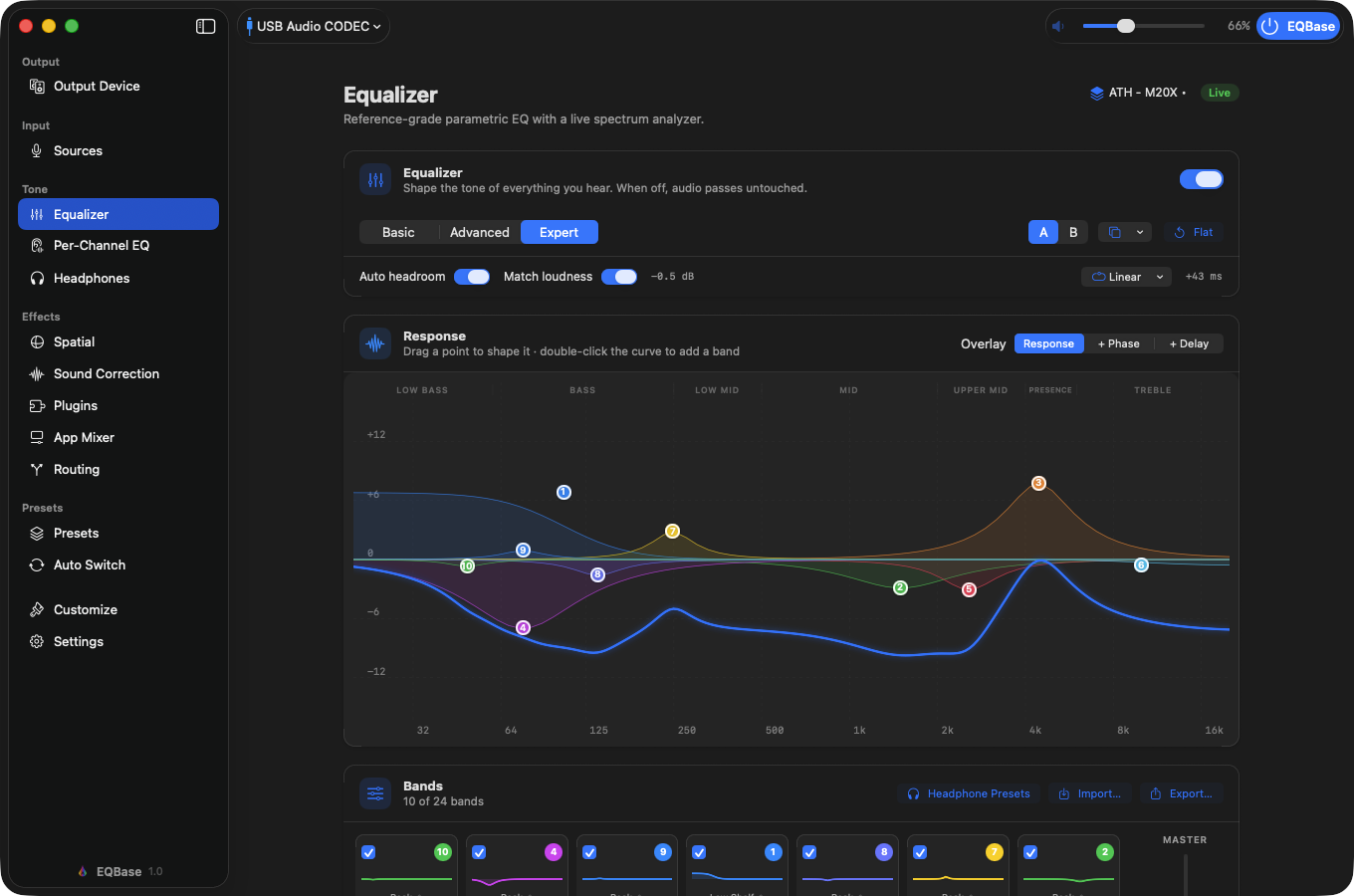
EQBase is a system-wide equalizer for macOS. It is a full app with its own window for the deeper work, plus a menu-bar popover for quick changes, and it processes everything your Mac plays in real time (browser video, calls, games, every app), from a simple 10-band graphic EQ up to a 24-band parametric one with dynamic and linear-phase filters. It adds zero samples of latency to the direct signal, and when every control is flat the processing chain is bit-perfect: samples leave exactly as they came in. Exactly two features add latency, both opt-in and both shown in the app's own latency readout: the true-peak limiter (2 ms of lookahead) and linear-phase EQ mode (about 43 ms at 48 kHz). Correction profiles for 6,000+ headphone models are built in, from the AutoEQ project. EQBase runs on macOS 14.4 (Sonoma) or later on both Apple silicon and Intel, sets up without installing a driver or asking for an administrator password, and supports sample rates from 44.1 to 192 kHz end to end. Beyond the equalizer it also does the things macOS leaves out: per-app volume, one-click recording of system audio, room measurement with automatic correction, audio routing, and working volume keys on outputs where macOS greys them out. The free tier has no time limit; Pro starts at $4.99 a month.
What is a system-wide equalizer for Mac, and what can it adjust?
A system-wide equalizer for Mac changes the tone of everything the Mac plays, from Safari and Spotify to calls and games, rather than one player's sound. macOS has no such equalizer built in; the Music app's EQ reaches only Music. What it adjusts is loudness by frequency: each band has a center frequency, a gain in decibels and a width (Q), and a preamp lowers the whole signal so boosts have room instead of clipping. A 10-band graphic EQ fixes its bands an octave apart, from 31 Hz to 16 kHz, and leaves you the gains; a parametric EQ lets you set every band's frequency, gain, width and filter shape, which is what an exact headphone or room correction needs. In EQBase the 10-band EQ and its preamp are free, and Pro adds a 24-band parametric EQ with dynamic and linear-phase filters. The same chain also sets volume and balance per output device, loudness compensation for quiet listening, and a separate correction layer for headphones and rooms.
Can EQBase record the audio my Mac is playing?
Yes, on the free tier, in one click from the menu bar. macOS itself has no way to save its own audio, and the common workarounds either cost money or route everything through a virtual output device, which then takes your volume control with it. EQBase already has the stream, so it just writes it: the finished post-limiter master, exactly what your DAC is handed, to MP3, AAC, ALAC, FLAC, WAV or AIFF. Your output device and volume keep working normally the whole time, and nothing is sent anywhere; the file goes where you pointed the save panel.
My volume keys don't work with my monitor or DAC. Can EQBase fix that?
Yes, on the free tier. When an output reports a fixed level (most HDMI and optical connections, and plenty of USB interfaces) macOS has nothing to change, so it greys the volume keys out and you are left reaching for the monitor's own menu. Turn the option on in EQBase and the keys drive EQBase's volume instead, with an on-screen HUD and no system bezel. It is off until you enable it, macOS asks for Accessibility permission at that click, and it only ever arms on outputs whose keys were already dead, so a device with real hardware volume is never intercepted.
Can EQBase measure and correct my room?
Yes, with Pro. EQBase plays a frequency sweep through your speakers, captures it with a microphone (a measurement mic if you have one, the built-in one if you do not), averages a few takes, and fits a parametric correction to what it found. It draws the measurement, the target curve and the fitted result on one plot, plus a decay map showing which frequencies ring on after the music stops, so you can see the reasoning rather than take it on faith. The result lands in EQBase's correction layer, underneath whatever curve you have set yourself, so the two do not overwrite each other.
Does EQBase install a driver?
Not to run the equalizer. EQBase reads the mix your Mac is already playing and mutes the original at the same instant, so there is no driver, no administrator password and no restart. The one thing setup asks for is permission to record this computer's audio, which is how macOS classes reading system audio. Two optional features do still use a small user-space Core Audio driver (never a kernel extension), and EQBase offers to install it at the moment you turn one on: Audiophile mode, which reads the samples untouched, and Pro routing, which publishes a virtual microphone other apps can select. Neither is part of a normal setup.
Does it color my sound when I'm not using it?
No, and the app proves it. With every control flat or bypassed the processing chain is bit-perfect: samples leave exactly as they came in, verified continuously and shown live in the app. Flat isn't "almost transparent," it's mathematically identical. How the audio reaches that chain is a separate question, and EQBase is specific about it: in the default mode macOS hands over a converted copy of the system mix, which we measured and will not call bit-perfect. Audiophile mode installs the driver and reads the samples untouched, measured at 100% identical, and the app tells you which path is live rather than making you assume.
Does Pro work offline?
Yes. Your license is validated online now and then, and a subscription keeps working for 14 days without any connection. A lifetime license works offline indefinitely. A flaky network never turns your sound off.
What if I don't like it?
The core app is free with no time limit, so you can take your time deciding. If you upgrade and change your mind, every purchase has a no-questions 14-day refund policy.
What does it run on?
macOS 14.4 (Sonoma) or later, on Apple silicon and Intel, one universal, notarized app. Sample rates from 44.1 to 192 kHz are supported end to end.
More reading: does macOS have a built-in equalizer? · how to make your Mac louder · how to boost bass · per-app volume control on a Mac · how to record system audio · volume keys not working? · room correction on a Mac · parametric EQ on a Mac · EQ latency for video and games · headphone correction on a Mac · importing AutoEQ and APO presets · virtual surround on headphones · who makes EQBase
Switching
Coming from another EQ?
This is a small category and the other tools in it are good. Here is where each one genuinely beats us, so you can skip the trial if the answer is obvious.
eqMac
Years of history, a large user base and code anyone can read, at a lower price. If those matter more to you than twice the headphone library, convolution, per-app routing or a provably bit-perfect idle path, it is a fair choice and we would rather you were happy than converted.
Boom 3D
3D surround, ambience and effects built to make audio bigger and more exciting rather than more accurate. That is a different goal from ours, and if it is the one you actually want, Boom 3D does it better than we do, though it stops at a graphic EQ and one output, where we go to parametric, convolution and per-app routing.
SoundSource
Rogue Amoeba's control panel sends each app's audio wherever you want it from a menu beside each app, with effects per app. EQBase's Routing patchbay goes further, but if you want per-app routing with no setup, SoundSource is the quicker answer.
Those three head to head are on the comparison hub, alongside ranked roundups of the best Mac equalizer apps and of the SoundSource alternatives.
What EQBase is for: a chain that stays mathematically out of the way until you ask it for something, correction curves measured for your actual headphones, and no latency added to anything you watch or play. If that is the part you have been missing, the free tier has no time limit, so download it and see.